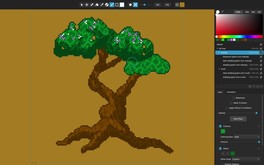
Pixelmash is an innovative new pixel art and animation tool based on non-destructive pixelization, perfect for game makers, artists, hobbyists, kids, and lovers of the 8-bit and 16-bit eras.
Modeled estimate, not a reported figure. How we estimate →
About


Stats
All-time low is the lowest price we've recorded for this game since we started tracking it.
Languages: English
Engagement
Reviews
Themes across 40 recent reviews and how positive each mention is. A keyword signal, not full sentiment analysis.
Reviews
I tried the demo for Pixelmash and was won over pretty quickly. It's not as all-encompassing as some tools out there, but it does a narrow set of things very well, which makes it feel extra intuitive and comfortable to use in a way few other tools do. The layer system is great, and being able to nest a layer in another layer and use the parent's pixels as a mask for the child layer is a great workflow, especially when paired with the non-destructive ability to stack effects. You can, for example, create a base color on the parent layer, draw some random pixels on the child layer, and then put a particle effect on the child layer to turn those random pixels into a moving animation that never strays from the bounds of the parent layer. You can add automatic outlines, create patterns and then save them out to use as custom dither patterns, and do all sorts of other interesting things. The Auto Shade effect is especially powerful for quickly adding some depth to an image. Auto Shade, Particles, and the Gradient effect all work together in really powerful ways for creating things like smoke, fireworks, and the like. If I had to criticize anything, I wish that it was easier to get a good loop with the particle system. It doesn't really loop, so if you want a seamless loop rather than a one-off effect like a firework, you'll have to make the motion quick enough that you don't notice the jump when it resets to the start of the animation. It's still very usable, but I've found that animations with slower movement that have to loop in a non-distracting way are best created in a different software. But Pixelmash can do things other software can't, like layers that are non-destructively downscaled to a target resolution while actually being higher resolution behind the scenes. These react differently to being moved around than layers that are at the downscaled pixel resolution, and you can mix and match layers or render a dynamic layer to the current downscaled resolution. There's a lot of flexibility here, and when you combine that with some really solid palette quantization features, it makes Pixelmash very powerful for converting pictures to sprite art. I'm also a big fan of the animation workflow that can do tweening super simply, as well as how good the software is at downscaling .svg files into pixel art that retains the underlying shape of the vector art. All in all, this is a deceptively powerful piece of software despite how easy it is to use. In my search for different software to use as a crutch for my fairly weak art skills, Pixelmash has been one of my favorite finds so far.
Media

Related
Related
Price dynamics, follower growth, revenue and sales trajectories with interactive tooltips
This and every other Pro feature is free until October 20, 2026. A free account is all it takes.
Hours played at review time, across 41 reviews with recorded playtime.
positive critical· bar length = how often the theme comes up
This review is a warning. I detected misleading reviews saying features are not available, luckily, those comments can't change the date they were posted. One common issue is the lack of straight line tool, it's available AND documented. Just right click for the first point and left click for the second point, Available since version 1.0.11 (So, all reviews after December 2029 saying there is no line tools are purposely misleading) Also, circle and rectangle tools are there since version 1.2.00 (So, circa 2019), same idea, comments after 2028 telling it is lacking those tools are misleading. As of today, it has a lot of tools including custom dither patterns. The only tool I miss is a tilemap tool.
Perfect!
This is some nice software from nevercenter. I use it in my pixel art pipeline to convert high res renders to sprites.
Después de probar muchos programas similares, me ayuda a realizar mis animaciones con RESULTADOS. Ojalá tenga actualizaciones constantes, pero lo que ofrece funciona bastante bien.
Nice
Bár én csak egy pár funkcióját használtam eddig, color limiter és átméretezés, de nem tűnik hasztalannak! Sőt! Trailerben látottak elég meggyőzőek. Szerintem sokkal jobb elismerést érdemelne, mint amennyi jelenleg az értékeléséből levonható!
Pixelmash is my favorite pixel art tool. It's like a swiss army knife for pixel art and keeps getting better with every update. It's not overly complicated and offers everything I need to make great pixel art, sprites and gifs.
很好用,效果也不错,期待更多的功能~
Players by region
Where this game's players are, estimated from review languages.
Related
| Game | Estimated lifetime revenue | Reviews | Review score | Price |
|---|---|---|---|---|
| $9.3M | 26.9K | 99% | $19.99 | |
| $359.5K | 519 | 81% | $34.99 | |
| $245.1K | 479 | 93% | $19.99 | |
| $218.2K | 434 | 97% | $14.00 | |
| $145.5K | 274 | 89% | $29.99 | |
| $64.5K | 208 | 87% | $14.99 |
Related
| Game | Estimated lifetime revenue | Reviews | Review score | Price |
|---|---|---|---|---|
| $21.4K | 276 | 92% | $2.99 | |
| $21.4K | 112 | 94% | $11.99 | |
| $21.4K | 232 | 71% | $3.49 | |
| $21.4K | 157 | 85% | $6.99 | |
| $21.4K | 727 | 91% | $2.24 | |
| $21.4K | 333 | 91% | $3.99 |