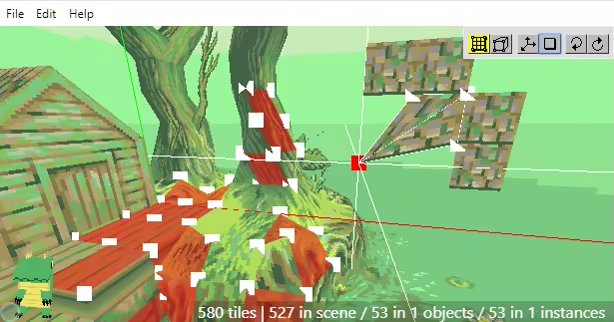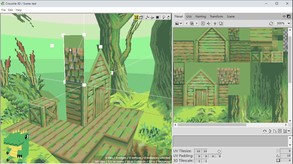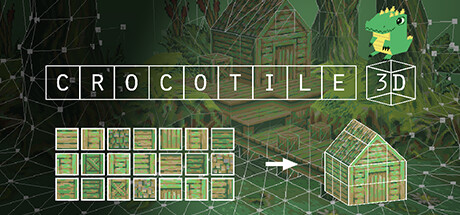
Crocotile 3D is a tile-based 3d modeling application. A great tool for creating lowpoly models and scenes with pixel-art textures. Select tiles directly from tilesets and place them into a scene to give them a third dimension. Use various tools to edit your tiles and shape your models.
Modeled estimate, not a reported figure. How we estimate →
Discounts
Every price cut of more than 20% we have observed, in each market that quoted one, with this game's chart position on either side of it. These are episodes, not a model: a sale is one event, and one event cannot tell you what the next one will do.
Reviews, worldwide (the counter carries no country): 0/day in the week to Sep 3 → 0.14/day in the week after.
Reviews, worldwide (the counter carries no country): 0/day in the week to Jul 22 → 0.38/day in the week after.
For scale, across Steam · Top Sellers · Brazil over the last 30 days: the 25 chart moves that followed a price cut of more than 20% went a median of 10 places towards #1, and the 2,413 moves with no price cut behind them went 2 away. One store, one chart, one country — it is the only place we have enough observations to say even that.
Prices outside the United States have been collected since 6 August 2026 and chart positions since 19 July 2026, so a cut older than that has no market to compare and a market that joined later has no history yet. Nothing here is converted between currencies.
About
Crocotile 3D is a tile-based 3d modeling editor. Originally released back in 2015 it is the first of its kind to use 2d tiles to construct 3d scenes. In contrast to most 3d applications that are bloated and over-complicated, Crocotile 3D is a simple to use tool targeted at creating lowpoly models and scenes with pixel-art tilesets or low-res textures. Simply select tiles directly from tilesets and place them into a scene to quickly give them a third dimension. Use various tools to edit your tiles and shape your models, let your imagination go wild!

Features Draw and Edit modes to easily add/remove/edit tiles in 3d space.
Perspective & Orthographic projection.
Export to and use your creations in other programs or in your game development.
Import files from other applications and continue working with them in Crocotile.
Place blocks like minecraft!
Modify UVs on tiles, adjust tileset sizes.
Paint Editor tools for creating/modifying your tilesets.
Rotate, flip, mirror, reverse faces, verts and UVs.
Vertex colors.
Lights and Shadows.
Animated Tiles / UVs
Animation and Movie rendering.
Skinning and Rigging (Bones and Vertex Weights).
Split/cut tiles.
Copy/paste tiles.
Group tiles into objects/prefabs.
Nested Instances.
Translate, rotate, and resize tools.
Undo/redo any changes.
And much more! (Click to read the Manual)
Demo and more information is available on the Crocotile3d website.
Engagement
Reviews
Themes across 48 recent reviews and how positive each mention is. A keyword signal, not full sentiment analysis.
Reviews
To be honest, I could never really wrap my head around the complexities of Blender or any 3D software like that. Crocotile 3D makes 3D modelling dead simple. Just playing around with it, I've already made some pretty complex objects in a really short span of time. If you have an inkling of how 3D game objects and characters are made and are looking to make low poly assets for a game project or just for fun, i can guarantee you'll probably get the hang of this pretty quickly. Even if you don't, the tutorials are pretty in-depth and easy to understand. Definitely worth a shot if you're looking to get into 3D.
this shi like minecraft but with a cool crocodile in the corner
Media

Related
Related
Price dynamics, follower growth, revenue and sales trajectories with interactive tooltips
This and every other Pro feature is free until October 20, 2026. A free account is all it takes.
Genres
Stats
All-time low is the lowest price we've recorded for this game since we started tracking it.
Languages: English, French, Spanish - Spain, Polish, Russian, Simplified Chinese, Spanish - Latin America, Swedish, Slovenian
Hours played at review time, across 48 reviews with recorded playtime.
positive critical· bar length = how often the theme comes up
this software got me into 3d modeling. i come from a background in painting- then 2d sprites, and without crocotile i would have never gotten into 3d modeling. I've been using this software for about 3 years and have made over a hundred models and 2 whole games with art i haven't created using Crocotile. its my favorite piece of software of all time. Im really thankful it exists.
this is by far the single piece of software that actually made it feel like I personally could 3d model. sparking a genuine and deep love for this medium. Crocotile 3d being light-weight enough that a complete newbie could feasibly learn every single feature with enough depth to actually use all of the features rather than forgetting niche use cases. I highly recommend crocotile 3d and personally consider it the best way to start learning 3d modeling.
Super easy to use at the cost of being relatively narrow in what you can easily do.
Crocotile 3D - это уникальный спасательный круг для 2D-художников и пиксель-артистов, которые хотят войти в третье измерение, но не готовы тратить месяцы на удушающее изучение Blender. Это идеальный инструмент для сборки low-poly (Низкополигональных) моделей, локаций и диорам из обычных плоских тайлов, который выдает стильную ретро-картинку в духе первой PlayStation, Nintendo 64 или классических DS-игр. Программа берет механику привычного 2D-редактора карт и переносит её в 3D. Вы буквально "строите" трехмерный мир,но используете для этого кусочки собственных текстур. [h2] Плюсы : [/h2] [list] [*] Порог входа равен нулю. Забудьте про полигоны, экструдирование и сложные модификаторы. Вы просто берете готовый тайлсет (например, нарисованный в Aseprite или Resprite) и "выкладываете" им стены, полы и объекты прямо в 3D-пространстве. [*] Идеальный ретро-пайплайн. Программа создана для low-poly и пиксельной эстетики. Она нативно сохраняет пиксели четкими (без автоматического размытия текстур) и позволяет собирать аутентичные ассеты для инди-игр быстрее любого тяжелого 3D-софта. [*] Шикарная работа с UV-разверткой. Кошмар любого 3D-шника здесь автоматизирован. Текстуры намертво привязаны к сетке тайлов, а благодаря обновлениям 2026 года появилась функция Projection UVs — можно мгновенно проецировать координаты трехмерного вида на плоскость в один клик. [*] Анимация и кости прямо внутри. Программа умеет анимировать не только сдвиг текстур (например, для создания бегущей воды), но и поддерживает полноценный Rigging & Skinning. Вы можете добавить кости вашей низкополигональной модельке и оживить её, не выходя из редактора. [*] Полный порядок с экспортом. Готовую сцену или персонажа можно в один клик выгрузить в форматы : ".obj, .gltf, .glb или .dae". Их без проблем можно скормить : Unity, Godot, Unreal Engine и даже кастомным плагинам для трехмерных движков на базе RPG Maker. [*] Официальный русский язык. В Steam-версии доступна встроенная русская локализация интерфейса, так что путаться в незнакомых терминах не придется. [/list] [h2] Минусы : [/h2] [list] [*] Узкая специализация. Программа - гениальна в своей нише, но за её пределами она беспомощна. Создать в ней высокополигональную модель, плавную округлость или сложную органику физически невозможно. Софт заточен строго под блочный, угловатый low-poly стиль. [*] Специфическая навигация. Управление камерой и переключение между режимами рисования (Draw) и редактирования (Edit) требует привыкания. Первые пару часов вы гарантированно будете путаться в кнопках и случайно ставить тайлы не туда. [*] Инструменты рисования "для галочки". Несмотря на наличие встроенного Paint-редактора, рисовать текстуры внутри Crocotile крайне неудобно. Гораздо эффективнее импортировать готовые палитры и тайлсеты из внешних 2D-программ. [/list]
An analogy to my experience is: 1) Open up app 2) Be unable to figure out anything 3) Go to their website for help 4) Find out you have to learn Japanese upside-down to continue. I was taken aback at how unintuitive this is and how nonsensical the default settings and controls are. Could be sooo SO easy to have a little pop up to explain the basics that the user can check a box when they no longer want to see it anymore. Why can't I just press right click or middle mouse button and move my mouse to rotate the environment. Clicking on a big crocodile (that stays on screen at all times for some reason), is the only way that I could get rotate my point of view. The keys they said would do it did nothing. And so many controls and rules are the way they are... seemingly just because? Every single action that I see in the trailer COULD have key bindings that could feel more natural, but just aren't. There is a Help button on the Menu bar that takes you to their website where they PROMISE you it's intuitive. I was trying to follow along their Getting Started section. I have a tile selected and am pressing the different keys that are supposed to do different things but literally nothing was working aside from the ones that would move the axis of the environment orthogonally. I know I barely spent any time in it, but I spent a bunch of time perusing their website and they really need to figure out how to make it more approachable and intuitive. After reading their website, the controls are so unnatural and against any conventions anywhere. Asking you to spend quite a bit of effort to get used to their really weird control system that will serve you literally no where else. Also I wasn't able to view the tiles I place from behind by default. Maybe there is a way to change that but it doesn't feel worth the trouble. Like I have spent a bunch of time learning programming languages, game engines, blender etc, but many of those are free and there are so many examples out there of practical use cases that it felt like it was worth investing the time into learning those apps. This feels like I'm going to have to blow way passed the refund window and spend a TON of time to know if it has a practical place in my workflow or not and with the controls being so weird, I unfortunately will not find out. Overall it was a bummer, because what I see in the trailer looks like a super neat, super cool tool to get lost in, but I don't feel like learning Japanese upside-down right now. Edit: Wanted to add, I have seen you respond to some of the negative reviews and it sounds like you care and I really appreciate that, but the users you listened to for control suggestions *were the wrong ones* because holy moly. I am still "Following" the program now, and will stay tuned updates.
it advertises itself as being tailored for low-poly ps1 stuff, but the 3d tilemap system also just makes it really good for creating environments in general. this thing has especially been a lifesaver for me when it comes to modeling interior room layouts, because you normally have to stay consistent with rigid angular stuff like door width/wall height/etc. and if i didn't have this thing to help me then all my environment models would probably look incredibly wonky. only downside is $30 is kind of ridiculous for what you get (it should be $15-$16 like Aseprite) so i had someone gift it for me.
Great tool to transition from 2D pixel art to 3D modeling! It's pretty much perfect for my workflow, and learning the program has been a treat with the developer's YouTube tutorials. If you're a pixel artist wanting to make a lowpoly 3D game or diorama, this is a great option!
I spent weeks crash-coursing Blender for one of my projects, and the entire process from beginning to end felt unbearable. Maybe I enjoyed the idea of working in 3D, but Blender's infinite menus and add-ons were too much. It was far too easy to accidentally do something beyond my comprehension and break everything. Crocotile 3D has GOT to be a necessity for any dev who's intimidated by Blender and not outright looking for a high-poly style, though it seems that if you're determined enough, you can definitely make some smooth models. It is remarkably intuitive once you learn the basics, and from my experience, it seems just about anything you could think of is highly customizable; you can remap nearly every action to make it similar to programs you're already familiar with, you can adjust the size of your tiles and grids at any time in order to add fine details, and experimenting with shapes and textures for my environments and building interiors has never been easier. This program is awesome, to say nothing of the dev who's still active in its community and updating it to this day, and I'm absolutely going to be getting my money's worth out of it.
Selling now
See how fast this game is selling right now — estimated copies and revenue per day from recent review growth.
Players by region
Where this game's players are, estimated from review languages.
Related
| Game | Estimated lifetime revenue | Reviews | Review score | Price |
|---|---|---|---|---|
| $0 | 14 | 93% | Free | |
| $7.3M | 21.3K | 99% | $19.99 | |
| $223.7K | 643 | 85% | $14.99 | |
| $954 | 5 | 80% | $12.99 | |
| — | 0 | — | — | |
| — | 0 | — | — |
Related
| Game | Estimated lifetime revenue | Reviews | Review score | Price |
|---|---|---|---|---|
| $145.4K | 477 | 69% | $18.99 | |
| $145.6K | 828 | 73% | $9.99 | |
| $145.6K | 430 | 63% | $9.99 | |
| $145.6K | 125 | 62% | $29.99 | |
| $145.6K | 606 | 77% | $9.99 | |
| $145.4K | 102 | 54% | $39.99 |