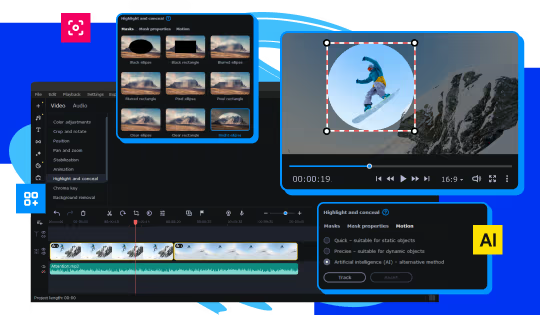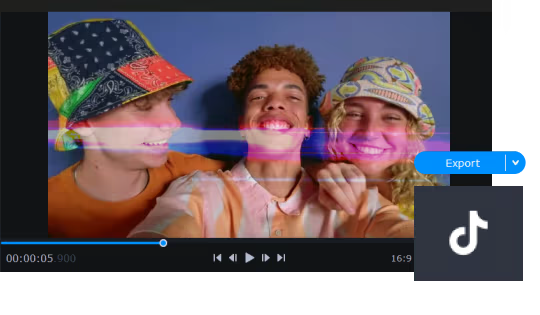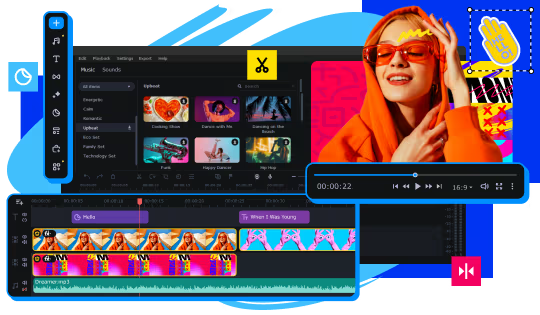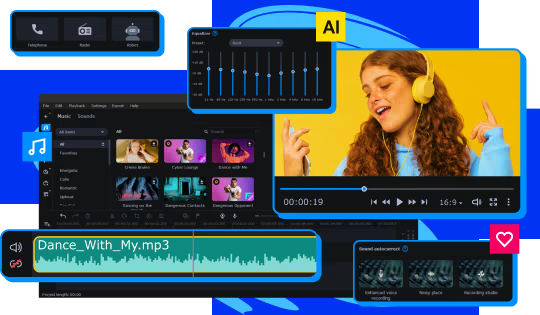
Skyrocket your creativity with the new and improved AI-powered Movavi Video Editor! Create top-notch gameplay videos automatically or tweak the settings to perfection by hand – you’ll get the best result in a breeze. Make your Let's Plays, walkthroughs, and gaming reviews go viral.
Modeled estimate, not a reported figure. How we estimate →
About


Genres
Stats
All-time low is the lowest price we've recorded for this game since we started tracking it.
Languages: English, French, Italian, German, Spanish - Spain, Dutch, Japanese, Korean, Polish, Portuguese - Brazil, Russian, Simplified Chinese +2 more
Add-ons
Each DLC is estimated with the same model as a game, then summed — a modeled figure, not reported DLC sales.
Engagement
Reviews
Themes across 44 recent reviews and how positive each mention is. A keyword signal, not full sentiment analysis.
Reviews
Easy to learn , and has great features
+rep
There are newer versions of this software and this, despite working perfectly has flaws, the extras are not worth. It is too hard to control/position multiple elements in a scene.
Media

Related
Related
Price dynamics, follower growth, revenue and sales trajectories with interactive tooltips
This and every other Pro feature is free until October 20, 2026. A free account is all it takes.
Hours played at review time, across 44 reviews with recorded playtime.
positive critical· bar length = how often the theme comes up
Movavi Video Editor 23 is a streamlined, beginner-friendly editing suite developed and published by Movavi that focuses on accessibility and ease of use rather than overwhelming users with professional-grade complexity. From the moment you open the program, the interface makes its intentions clear: it presents a clean workspace with an intuitive timeline, straightforward media browser, and a preview window that keeps everything visible without clutter. It is designed for users who want to start editing immediately—whether they're crafting YouTube videos, polishing family footage, or assembling simple marketing content—without needing to spend hours learning advanced workflows. The editing tools provided in Movavi Video Editor 23 cover a wide range of essential functions. Cutting, trimming, and splitting clips are effortless thanks to its drag-and-drop timeline, and even those with no editing experience will find the controls uncomplicated. The software includes a variety of preset transitions, filters, titles, and stickers that can quickly add polish to a project, and the built-in audio tools allow you to clean up sound, adjust volume levels, or mix background music with minimal trouble. For users seeking slightly more advanced options, features like stabilization, color adjustment, chroma key background removal, and automatic enhancement provide a taste of more sophisticated editing without demanding a steep learning curve. One of the strongest aspects of Movavi Video Editor 23 is how smoothly it handles day-to-day editing tasks. For standard 1080p projects, the software generally runs fast, allowing for real-time previews and quick exports. Simpler effects render with minimal delay, and the interface feels responsive even on mid-range hardware. This performance profile is part of what makes Movavi appealing to new editors—it gets out of the way and lets users focus on arranging their clips and building their stories. However, the limitations become more noticeable when working with heavy 4K footage, complex filter stacks, or large multi-track projects. In those scenarios, playback may stutter and the program’s consumer-level engine shows its boundaries. Movavi Video Editor 23 also benefits from its gentle learning curve. Tutorials and tips are integrated into the experience, and most tools behave predictably, helping beginners feel in control almost immediately. This makes the software well-suited for hobbyists, students, and casual creators who want appealing results without delving into advanced keyframe manipulation or intricate color grading systems. Compared to professional tools like DaVinci Resolve or Adobe Premiere Pro, Movavi offers far less depth, but far greater immediacy. It simplifies choices, prioritizing clarity over power, and the result is a tool that users can master in hours rather than weeks. The program does come with some drawbacks—many tied to its approachable nature. Experienced editors will quickly notice the absence of certain advanced features: multi-cam editing, detailed color correction, extensive audio mixing capabilities, and complex motion tracking are either simplified or unavailable. While the software does support a range of codecs, compatibility issues can arise, and some components may require additional packages or updates. Another common criticism involves Movavi’s licensing structure: while Movavi Video Editor 23 provides a solid base package, additional effects, templates, and content packs are often locked behind separate purchases or subscription models, which may disappoint users expecting a fully all-in-one solution. Despite these limitations, Movavi Video Editor 23 offers clear value for its intended audience. It strikes a balance between simplicity and functionality that makes editing approachable without sacrificing too much creative potential. For content creators who want fast results with minimal learning effort, or families compiling personal videos, the software delivers exactly what it promises: an easy-to-use editing environment with enough tools to make attractive, polished content. For aspiring professionals or users seeking advanced controls, it serves better as a stepping-stone before moving on to more powerful editing platforms. In the end, Movavi Video Editor 23 succeeds by knowing its niche and fulfilling it well. It doesn’t attempt to rival professional editing giants, nor does it burden new users with unnecessary complexity. Instead, it provides a friendly, efficient, and enjoyable workspace where beginners can learn the fundamentals of video editing and produce quality results quickly. For those who value simplicity, speed, and a low barrier to entry, Movavi Video Editor 23 remains a reliable and inviting choice. Rating: 7/10
Excelente.
Łatwy w obsłudze, robi robotę polecam
Hi, I really like it, I still try some other products because I think they are move up to date and more features. But they are often a bugfest and difficult to use. This one I always return and do it then here. For my usecase it is perfect. Two things I wouldl ike to see: 1. Preview of effects with actual video material and not some stock pictures. 2. Effects in a different lane so I can fade them in or out and not only applied to the while clip. Sadly, due to this one having the best review, I hesitate to upgrade... :/
Купил прогу уже как 3 года нет обнови но хотя на офф сайте уже есть версия за 2026 год
Bueno es facil de usar, y me costó barato en descuento, vale la pena. ojalá den más actualizaciones en el futuro.
сыфвф
Selling now
See how fast this game is selling right now — estimated copies and revenue per day from recent review growth.
Players by region
Where this game's players are, estimated from review languages.
Related
| Game | Estimated lifetime revenue | Reviews | Review score | Price |
|---|---|---|---|---|
| — | 267 | 66% | — | |
| $224.4K | 177 | 66% | $79.99 | |
| — | 719 | 76% | — | |
| — | 1.1K | 78% | — | |
| — | 474 | 81% | — | |
| — | 514 | 81% | — |
Related
| Game | Estimated lifetime revenue | Reviews | Review score | Price |
|---|---|---|---|---|
| $446.6K | 4.4K | 96% | $4.99 | |
| $446.6K | 627 | 79% | $19.99 | |
| $446.6K | 403 | 75% | $39.99 | |
| $446.3K | 769 | 85% | $19.99 | |
| $446.2K | 2.1K | 95% | $11.99 | |
| $447.1K | 631 | 65% | $18.99 |