
Movavi Video Editor Plus 2022 - Video Editing Software
Montage in Movavi Video Editor Plus is easy, fast, and fun. Creating thematic clips, experimenting with sound, and adding special effects are all in reach, even if you have no video editing experience. You can be uploading files directly on YouTube in 20 minutes, so embrace your creative self!
Estimated lifetime revenueMedium confidence
—gross
—
Modeled estimate, not a reported figure. How we estimate →
Est. copies sold
6K
mid estimate
Reviews
267
Review score
66%
6.6/10
About
About the game
Try video editing with Movavi Video Editor Plus!
Use the handy montage table to join clips, edit images, and add music and special effects. You will not only learn to montage like a pro but will improve your skills with every project you take on.
What’s New:
Anyone can montage videos like a pro. With Movavi Video Editor Plus, even beginners can start video editing right away. Experienced users can upgrade their skills and begin to work with new tools.
For beginners
For advanced users
Movavi Video Editor Plus is not just an application but a helpful friend who will guide you through the video editing process. No need to spend hours trying to figure out how to use the program – just start editing, and the program itself will guide you.
Why choose Movavi Video Editor Plus?
Share your projects
Save videos in any format and upload to YouTube and Google Drive right from within the program.

Use the handy montage table to join clips, edit images, and add music and special effects. You will not only learn to montage like a pro but will improve your skills with every project you take on.
What’s New:
- Audio tools: reduce the difference between loud and soft sounds and set the decibel level
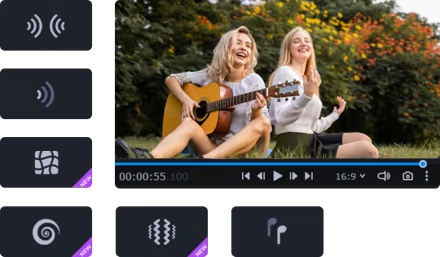
- Audio effects for sound and music distortion
- Export video quality control
- Tooltips for using advanced controls
Anyone can montage videos like a pro. With Movavi Video Editor Plus, even beginners can start video editing right away. Experienced users can upgrade their skills and begin to work with new tools.
For beginners
- Use automated mode: just add your files, choose a video theme, music, transitions, and effects. The program will do the rest
- Add videos, photos, and music on the montage table to edit your files
- Edit pictures: crop and rotate images, change brightness and contrast levels, and shapren details
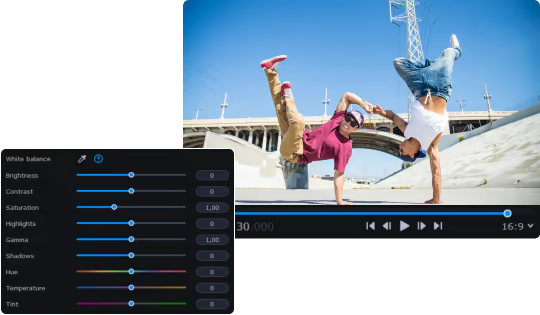
- Experiment with effects: choose comic stickers, change colors with filters, add glare, or darken images
- Change text: choose the font and apply animation
- Change volume and decrease background noise
For advanced users
- Attach titles and animations to any moving object
- Work with vertical videos. The program will remind you to change aspect ratios for vertical video and help you to cut the black bars
- Use special effects like Chroma Key, Reverse, Stop-motion
- Apply audio effects: distort sounds and set decibel level
- Create opening and closing intros and audio. Add text, effects, and animation
- Record a voiceover
Movavi Video Editor Plus is not just an application but a helpful friend who will guide you through the video editing process. No need to spend hours trying to figure out how to use the program – just start editing, and the program itself will guide you.
Why choose Movavi Video Editor Plus?
- Simple interface: it’s easy to understand how you can use all the available tools
- User-friendly tooltips will help you with the advanced controls
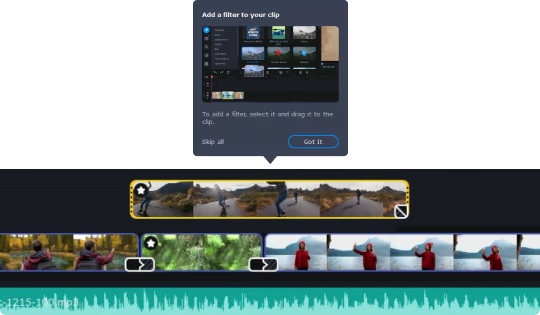
- Multimedia library with dozens of free effects, sounds, and transitions
- Motion Table supports up to 99 tracks
- Smart Media bin to store and organize your files
- Full HD support
Share your projects
Save videos in any format and upload to YouTube and Google Drive right from within the program.