Learn, Build, and Play with an all-new update that makes game development easier than ever. Dive into our video tutorials and learn everything you need to bring your ideas to life. Create with ease using our intuitive visual editor and Lua script. Publish your projects with a royalty-free license.
Modeled estimate, not a reported figure. How we estimate →
Discounts
Every price cut of more than 20% we have observed, in each market that quoted one, with this game's chart position on either side of it. These are episodes, not a model: a sale is one event, and one event cannot tell you what the next one will do.
Reviews, worldwide (the counter carries no country): 0/day in the week to Jul 30 → 0.71/day in the week after.
For scale, across Steam · Top Sellers · Brazil over the last 30 days: the 25 chart moves that followed a price cut of more than 20% went a median of 10 places towards #1, and the 2,413 moves with no price cut behind them went 2 away. One store, one chart, one country — it is the only place we have enough observations to say even that.
Prices outside the United States have been collected since 6 August 2026 and chart positions since 19 July 2026, so a cut older than that has no market to compare and a market that joined later has no history yet. Nothing here is converted between currencies.
About
Leadwerks Game Engine 5 is an all-new version that makes game development easier than ever. Dive into our video tutorials and learn everything you need to bring your ideas to life. Create with ease using our intuitive visual editor and Lua script. When you're ready to publish, you keep 100% of your profits with our royalty-free license.
Our new multithreaded architecture prevents CPU bottlenecks, to provide order-of-magnitude faster performance under heavy rendering loads. Build with the confidence of having an optimized game engine that keeps up with your game as it grows.
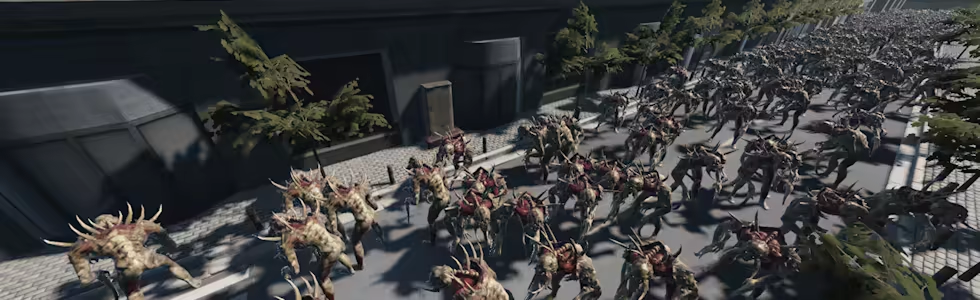
Achieve AAA-quality visuals with PBR materials, customizable post-processing effects, hardware tessellation, and a clustered forward+ renderer with support for up to 32x MSAA.

Built-in level design tools let you easily sketch out your game level right in the editor, with fine control over subdivision, bevels, and displacement. This makes it easy to build and playtest your game levels quickly, instead of switching back and forth between applications. It's got everything you need to build scenes, all in one place.
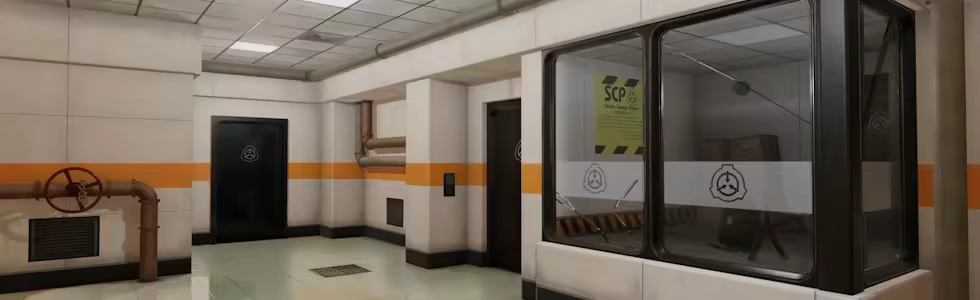
Add intricate details and visual interest by painting materials directly onto your level geometry. Seamless details applied across different surfaces tie the scene together and transform a collection of parts into a cohesive environment, allowing anyone to create beatiful game environments.

We've added a powerful new mesh reduction tool that decimates complex geometry, for easy model optimization or LOD creation.
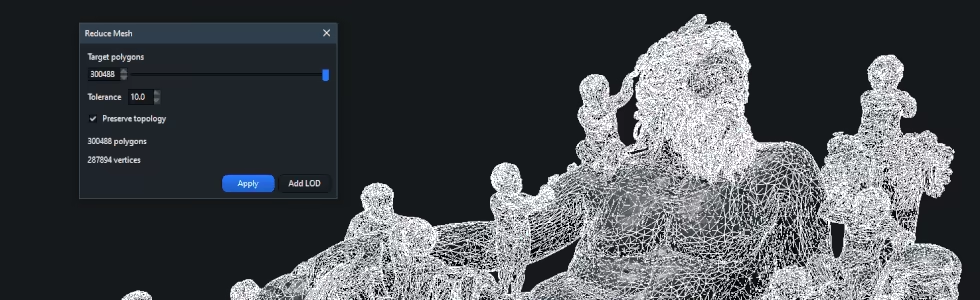
Populate your outdoor scenes with dense, realistic foliage using our innovative vegetation system. It dynamically calculates instances each frame, allowing massive, detailed forests with fast performance and minimal memory usage.

Our navigation system supports one or multiple navigation meshes that automatically rebuild when objects in the scene move. This allows navigation agents to dynamically adjust their routes in response to changes in the environment, for smarter enemies and more immersive gameplay possibilities.
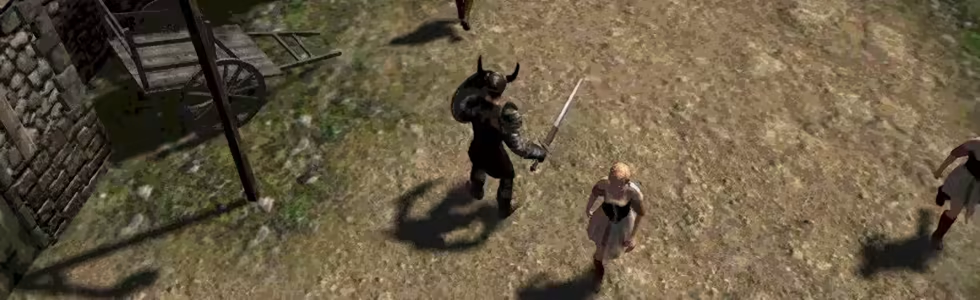
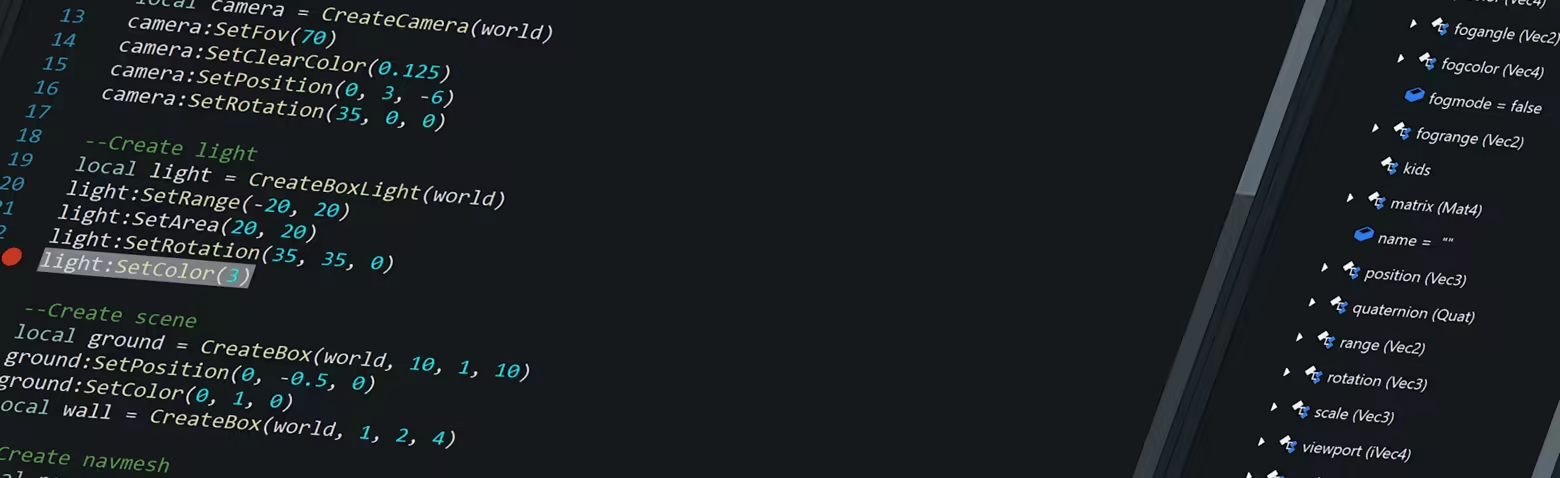
Lua script integration offers rapid prototyping with an easy-to-learn language and hundreds of code examples. The built-in debugger lets you pause your game, step through code, and inspect every variable in real-time. For advanced users, C++ programming is also available with the Leadwerks Pro DLC.
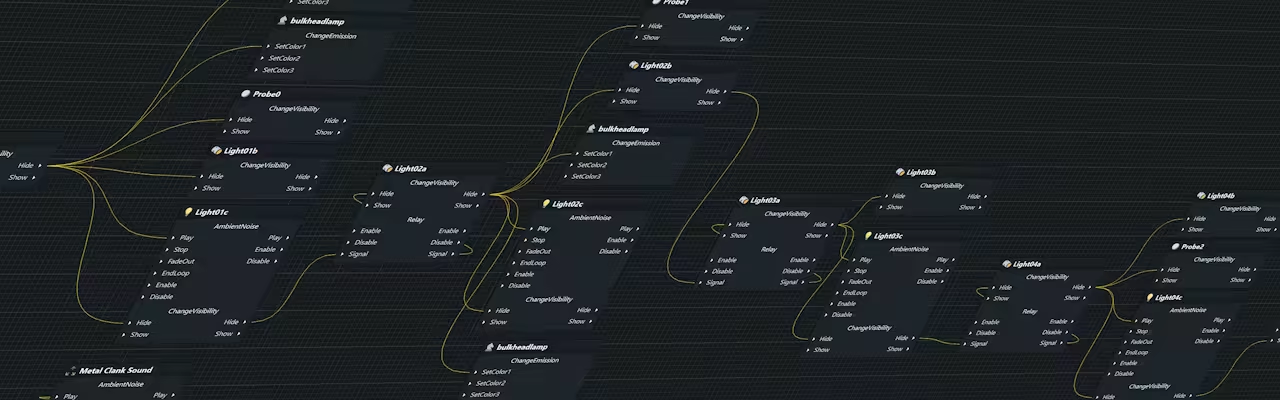
The flowgraph editor provides high-level control over sequences of events, and lets level designers easily set up in-game sequences of events, without writing code.
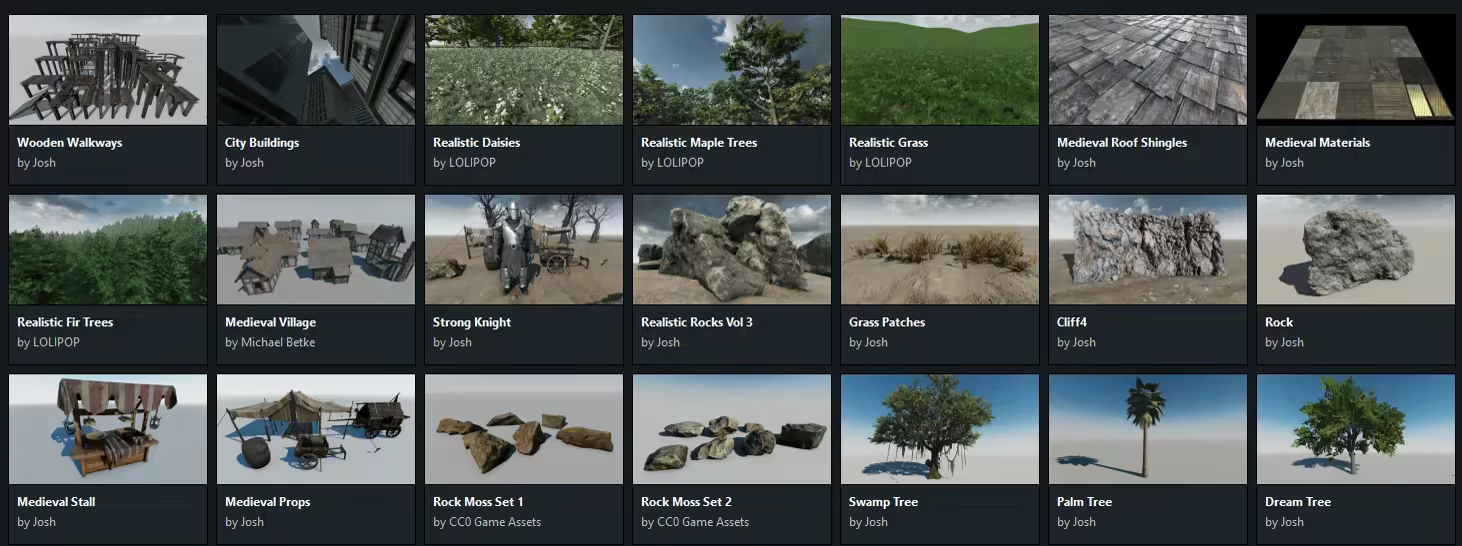
Download thousands of ready-to-use PBR materials, 3D models, skyboxes, and other assets directly within the editor. You can use our content in your game, or to just have fun kitbashing a new scene.
Are you stuck in "tutorial hell"? Our lessons are designed to provide the deep foundational knowledge you need to bring any type of game to life, with hours of video tutorials that guide you from total beginner to a capable game developer, one step at a time.
When you get Leadwerks, you can make any number of commercial games with our developer-friendly license. There's no royalties, no install fees, and no third-party licensing strings to worry about, so you get to keep 100% of your profits.
Multi-threaded rendering architecture
Clustered forward+ renderer with uniform lighting model and optional depth prepass
Multi-display support
PBR materials
Load 3D models from glTF, OBJ, MDL, and FBX (using glTF converter)
Image loading, saving, processing
Vertex, pixel, geometry, and tessellation shaders
Normal mapping with specular
Customizable post-processing effects stack
Crack-free hardware tessellation
Environment probes
Instanced rendering
Real-time mesh modification
Imposters
Build-in level design tools using constructive solid geometry
Edit level geometry in 2D and 3D viewports
Carve and hollow boolean operations
Build-in mesh reduction tools to optimize models or generate LODs
Integrated script editor
Easy-to-code Lua API with over 800 commands
Auto-completion
Hover mouse to show command syntax
Visual flowgraph connects script functions to set up sequences of events
Advanced programmers can use C++ (requires Leadwerks Pro DLC)
Dynamically sculpt and paint terrain
Cut holes in terrain
Up to 256 material layers
Terrain foliage system
Load and save Khronos glTF files
Load and save Wavefront OBJ files
Convert FBX files to glTF and load
Convert Collada files to glTF and load
Build-in mesh reduction tools for optimizing models or generating LODs
Animated skinned characters
Share skeletons across multiple characters
Attach objects to bones
Built-in animation transition and update system
Hardware skinning
Blend and transition animations
Fast and accurate asynchronous rigid body physics
Constraints including hinge, ball, kinematic, plane, and sliding joints
Motorized joints with limits
Generate physics shapes
Swept collision
Raycasting with lines or spheres
Navmesh pathfinding
Crowd avoidance and steering
Navigation areas visible in editor
Physics-based character controller
Automatic AI following
3D sound spatialization
Head-related transfer function (HRTF)
Audio filters including distortion, flanging, echo, and EAX reverb effects
Emit a sound from any entity
Automatic channel management
Skip to any time in sound
Resolution-independent for any DPI
Extensible widgets system
Load SVG vector images
Set widget and item image
Change mouse cursor
Custom color schemes stored in JSON files
Model files can be loaded from and saved to glTF and OBJ format, or converted from FBX format.
Textures can be loaded from DDS, PNG, JPG, BMP, TGA, PSD, and other image formats.
Audio can be loaded from WAV, MP3, and OGG formats.
ISPC Fast Texture Compression, including BC7 and BC6h pixel formats
Zip package loading and saving
Thread management, with mutexes and semaphores
File I/O
File system watcher
Memory allocation and management
String manipulation (split, search, conversion, etc.)
Message boxes and file / folder requester
SteamVR integration with support for a variety of headsets
Fast stereoscopic rendering
Controller input and display
Attach objects to hand controllers and headset
Translation and rotation view offset
Authenticate application ownership
Get user info
Leaderboards
Stats and achievements
Multiplayer lobbies
Peer-to-peer networking
Engagement
Reviews
Themes across 52 recent reviews and how positive each mention is. A keyword signal, not full sentiment analysis.
Reviews
Great software to learn game development and programing
Instructions are excellent . I haven't seen any other 3d game making software that has so much information available at the editor level and readily able to access while you are working. Most 3d engines require a lot of time to find precise information. So yes this approach I like very much.
[h2]Introduction[/h2] Leadwerks is a user-friendly game engine with LUA scripting and C++ in the Pro version. At the time of this review, I've held Leadwerks in my Library since 2021. However, I cannot recommend this game engine for anyone who is actively attempting to make a game. From the lack of transparency from the developers to the strange design decisions that do not allow developers to pursue the avenues they want; it's a game engine with potential but crippled by design. To understand why I have given a do not recommend, we need to discuss the following topics: [list] [*] Documentation and Examples [*] Compiler & Platform Dependency [*] Cross-platform Limitations [*] Miscellaneous [*] The Positives [*] Conclusion [/list] [h2] Documentation & Examples [/h2] Leadwerks documentation is not the worst compared to other game engines. The online documentation contains the basic information for understanding the class you’re attempting to use. There is a lack of examples for majority of the classes and the basic examples that exist do not cover the most basic use cases. When asked about this on the forum or official Discord, you will be redirected to download the examples that are available on the website or through the engine’s download manager. There’s a very limited number of examples in the download manager and nothing to show you the possibilities in the engine. One of the most important factors when developing a game engine is to use the engine to document and display information. For example, many modern engines have a “Examples room” that shows every possible node, entity, or lighting that is available in the engine. In that room, it will display on the floor or wall “this is a light probe, press x to change the type” and with those probes a code example accompanies the display. Allowing the user to both experience that feature and dive into the code in one go. The primary problem with these examples is blatant code-heavy nature. When learning a game engine, you’re instructed on learning the fundamentals of workings with the engine; this may include drag-and-drop sequences, editor functionality, and scripting basics. Leadwerks throws that out the door and tells you to immediately code, in Lua, all the functionality immediately. Want a camera pointing at a 45-degree angle with an orthogonal perspective? The example will show you how to do that with code only. It will not mention you can right click on the entity list and create a camera and handle it from there. C++ documentation is almost non-existent; the developer of the engine seems focused on developing Lua section rather than the C++ section. When faced with this dilemma, you will be told to take a look at the Lua examples and translate them to equivalent C++ version. [h2] Compiler & Platform Dependency [/h2] Leadwerks heavily relies on the MSVC compiler, and it shows. I understand that it’s the most popular compiler for Windows operating system; however, I’ve been developing software for Windows for many years and have almost exclusively used the MinGW32 & MinGW64 compilers. Never once ran into performance issues, limitations, or anything the developer mentions for choosing MSVC as the primary compiler. I’ve successfully used MinGW to develop Rendering Engines, Emulators, Game Servers (Client-Server Architecture), and a few other projects. Additionally, this means you will need to download a 30GB compiler with a specific toolset in order to use the C++ side of Leadwerks. MSVC is Windows only as well, so development on other platforms is null and void. [h2] Cross-platform Limitations [/h2] If your goal is to ship a game to more than Windows and Linux, I highly recommend you look the other way. Leadwerks does not support any platforms beyond those two, and there are no plans to add additional platforms. There’s no Console support, no Android, no iOS, and no Web. The most basic platforms are not supported and there is no way for a developer to add the platform themselves since the source is not available for modification. Source availability allows the developer, under the provided license, to add, modify, and remove code from the engine and build their own copy under the premise the developer does not claim to own the engine or the code in it. Unreal engine is source-available, Unity is source-available, Defold is source-available, just to name a few. All it requires is a Non-disclosure Agreement and a good lawyer and this engine can become source-available. [h2] Miscellaneous [/h2] Editor extensions are non-existent, according to the developer it is possible and exists in the engine files and you can use that as an example to make your own extensions. Why isn’t it documented? The rendering system is locked, and you can’t change that. You’re allowed to create Fragment and Vertex shaders, that’s it. Geometry and Compute shaders are not allowed to be created, this hinders creativity of the developer, specifically with those who want to create their own tools and functions. According to the developer it’s because the engine is asynchronous in nature. That is an excuse, most game engines are asynchronous, what is done is all the shaders are loaded on start-up and the shader program is saved to use later. Even Vulkan does this. Blackboxing is the way of the engine, just like Game Maker Studios 2, so you will be using functions without ever knowing what they do. This leads to the same problem I mentioned above with the rendering system, you cannot change the way the engine flows because the developer wants to keep you on the train tracks they’ve built. Any attempts to derail will break the engine. You may create your own functions for your game specifically, such as character movement, but if you want to mess with the physics engine or modify it? Nope. Want to change the rendering pipeline? Nope. Want to change or remove the Entity system? Nope. Want to change or add to the terrain system? Nope. This can go on for a while, so I will end it here. When asking if a certain bug or feature was fixed because you had problems with it, most of the time you will just be redirected back to the online documentation; as if that answers the question. Take a look at the Discord and you will see this happening often. [h2] The Positives [/h2] The Leadwerks Engine has a smooth UI that is highly responsive and pleasing to look at. The build tools included in the editors are some of the best I've seen in any game engine. They're smooth and easy to work with, support Boolean operations, can be textured and painted, and overall can be used to create a solid base for you game levels without ever needing to leave the editor. The Discord and forum have a lot of useful information and you’re always welcome to have discussions about the engine and its features. However, be warned the forums do contain a lot of legacy information that may not be relevant anymore. [h2]Conclusion[/h2] Leadwerks is a game engine that has potential to rival other engines in the industry but is pushed back by the decisions made by the developers. The ease of use and asynchronous nature does provide performance boost and sustainability and yet hinders modification of the rendering pipeline, extensibility, and creativity. The inability to port directly to other platforms using the editor and the inaccessible nature of the source code prevents developers from reaching a broader audience; losing possible sales. The dependency on the MSVC compiler forces users to download a 30GB compiler to simply compile their C++ scripts for better performance.
Media

Related
Related
Price dynamics, follower growth, revenue and sales trajectories with interactive tooltips
This and every other Pro feature is free until October 20, 2026. A free account is all it takes.
Stats
All-time low is the lowest price we've recorded for this game since we started tracking it.
Languages: English
Hours played at review time, across 52 reviews with recorded playtime.
positive critical· bar length = how often the theme comes up
Логика маркетингово продвижения претерпела множество иллитираций, но пришла к логическим истокам ветки Leadwerks, что несказанно радует в плане продолжения. Джошь заимствовал идею программы от Lee Bamber (AppKit), чтобы собрать на Кикстартер финансирование на Ultra App Kit для продолжения разработки Ultra Engine, но в потребительском сегменте название вызывало когнитивный диссонанс и спустя время название пришло к своим истокам по продолжительности разработки - Leadwerks. О движке; -логически понятен в русском сегменте программирования -аутентичен, но усовешенствован по сравнению с предидущей генерацией движка -интуитивно понятен для людей без навыков программирования В принципе, я участвовал в идеях совершенствования в Дискорде движка UltrtaEngine и профинансировал разработку Ultra App Kit покупкой копии программы, потому что был заинтересован развитием проекта до идеи Leadwerks 5.
мой отзыв на движок. позитивный, небольшое предисловие. к сожелению ultra engine pro = Leadwerks 5 . не заслуженно. обделен пиаром. я вспомнил те времена. когда люди использовали луа и модинг. тут без гемороя модинга , где надо досконально знать си++ и писать свой распоковщик. и иметь миллион утилит. на все случае жизни. в ultra engine pro = Leadwerks 5 все проще. и лучше сразу делать Leadwerks 5. чем потом сидеть и думать. почему куб тормозит н 5090 часть функционала графического "пока*" не имеет. да! да ключевое слова "пока" .он! активно развивается. на глазах ! в коде сделать все реально. движок полностью рабочий. разработчик на связи активно поддерживает даже по глупым вопросам .по моим глупым вопросам. что говорит о его заинтерисованности в развитий проэкта. плюсы -активная поддержка . как пользователя. так и сам продукт. если ты задаешь вопрос на форуме, в скорее, получишь ответ. -хорошая поризводительность -хорошая документация. и на форуме leadwerks, очень много материала для изучения. -редактор визуально не перегружен . - поддержка луа. что дает более опытному кодеру. сделать быстро прототип. без кучи библиотек редакторов и идешечек. -есть фоловграф. это почти как блю принт. но есть различия. блюпринты - это визуальное программирование. а тут сперва напиши необходимые функций. а потом используй их , как в блюпринте. вообщем мне показалось даже удобнее.но ни-кто не мешает вам. написать либу юзать и по другому) . я не уверен в этом. пока небыло небходимости лезть в фолов граф. - сам двиг написан на си++. и тут вам не все открыто. но можно многое . си ++. будет вам счастье. но и минусы конечно есть. -заточенность под пк. на андроид или ps5 как собрать материал найти будет сложно. задавайте ворос на форум вам скажут точнее. -графически редактор , не дает всей возможности движка. и не всегда интуитивно понятен. требует внимательных кликов мышкой :) . да я пос-то тыкал -порог вхождения, материала по нему сейчас тоже немного. но для использования . более чем достаточно. за глаза для старта. вообще даже ловил себя на мысли. все просто, это я тупой. стоит отдельно по ковыряться в лицензий ,и подумать подходит ли она вам. а возможно и про дает много. возможно больше чем надо, берите была лицензия по проще. может даже комюнити версия есть. для того что-бы пощупать и попробовать. мне для личного , более чем подходит. я "про" купил pro ена вороса тогда 3200, сейчас 1600. и не жалею. хотя "про" функций я не спользую. мое хобби, со времен модов. на сталкер и халву.
se dovete imparare un programma per creare dei videogiochi usate unity
Leadwerks – классный, легкий, обладающий широкой функциональностью, но при этом не содержащий ничего лишнего игровой движок. С его помощью любой мало-мальски подкованный компьютерщик может за месяц создать полноценную игру, учитывая, что в этот месяц входит не только разработка, но и изучение движка. Leadwerks обладает прекрасными визуальными возможностями для создания и редактирования уровней, настройки статичных объектов, оживления персонажей и других динамических объектов. Логику игры можно создавать на C++, но это сложный вариант. Гораздо лучше воспользоваться удобным и легким в изучении скриптовым языком Lua. Leadwerks имеет прекрасную поддержку последнего. Этот язык необычайно гибок и выразителен. Можно просто прикрепить к любому объекту в сцене скрипт, в котором описать логику жизнедеятельности этого объекта, и, вот, он оживает!
Thank you very much for the update
Even if you don't know how to code, this is one of the better 3D scene creators out there.
I didnt start a project yet, but this dev (and the engine) absolutely deserves all the love that's going or will be going his way. I've been following the progress for quite a while now and I am quite literally amazed. Great Job and keep it up!
Players by region
Where this game's players are, estimated from review languages.
Players also reviewed
The games this title's players most often review too — audience affinity.
Related
| Game | Estimated lifetime revenue | Reviews | Review score | Price |
|---|---|---|---|---|
| — | 198 | 81% | — | |
| $830.2K | 2.1K | 72% | $19.99 | |
| $254K | 3K | 92% | $4.99 | |
| $40K | 182 | 59% | $9.99 | |
| $4.7K | 12 | 0% | $24.99 | |
| $0 | 0 | 86% | Free |
Related
| Game | Estimated lifetime revenue | Reviews | Review score | Price |
|---|---|---|---|---|
| $158.3K | 500 | 92% | $19.99 | |
| $158.3K | 200 | 65% | $19.99 | |
| $158.2K | 8.4K | 92% | $0.74 | |
| $158.2K | 224 | 88% | $49.99 | |
| $158.4K | 2K | 71% | $4.99 | |
| $158.4K | 320 | 86% | $14.99 |