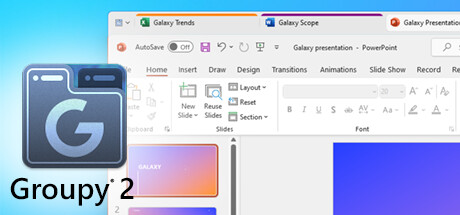
Groupy 2 is a powerful tool that keeps information tabbed and organized by allowing users to drag and drop multiple applications and documents together, grouping them in a familiar tabbed interface for easy access.
Modeled estimate, not a reported figure. How we estimate →
Discounts
Every price cut of more than 20% we have observed, in each market that quoted one, with this game's chart position on either side of it. These are episodes, not a model: a sale is one event, and one event cannot tell you what the next one will do.
Reviews, worldwide (the counter carries no country): 0/day in the week to Sep 7 → 0.43/day in the week after.
For scale, across Steam · Top Sellers · Brazil over the last 30 days: the 25 chart moves that followed a price cut of more than 20% went a median of 10 places towards #1, and the 2,413 moves with no price cut behind them went 2 away. One store, one chart, one country — it is the only place we have enough observations to say even that.
Prices outside the United States have been collected since 6 August 2026 and chart positions since 19 July 2026, so a cut older than that has no market to compare and a market that joined later has no history yet. Nothing here is converted between currencies.
About
Engagement
Reviews
Themes across 46 recent reviews and how positive each mention is. A keyword signal, not full sentiment analysis.
Reviews
Game-changer of a Windows mod where you can have programs as tabs, even Steam Client can be a tab with your friends and settings or you can run a bunch of games in tabs for a very clean experience when running tons of clicker games all the time --- they can be crammed into one window. Doesn't work for games with a locked window, but it works with enough of them, and the file explorer tabbed browsing is amazing too. Lots of ways to tweak it to get it behaving exactly right. I already had Groupy 1, but I forgot these existed and installed it again to try it and it worked so flawlessly for me that I grabbed Groupy 2 to get the latest polished-up version here. It has the ability to multi-launch things and group them, plus colored tabs and saving profiles of groups of apps to launch, it's another level of game-changer but all of those new features I got it for don't work well at all. It launches everything so rapidly they don't end up grouped together sometimes, there are no fine controls over how these new functions work, I would maybe set a delay per app being launched... launching a dozen programs might need a millisecond here or there! Also, when I have groups of windows compressed to single taskbar icons, they don't really want to come back half the time it keeps vanishing when I click on taskbar but I can make the window come back if I use the hover-peek-view on the taskbar to grab another tab from that group, it will come back. Basically, it's not perfect, and Groupy 1 was probably good enough for me. Here's hoping since it's a current product it receives some polish down the road still to perfect it. I find it a critical program for me to have though, because if I have 10 games open, 10 file explorer windows, multiple chrome sessions, notepads, video creation software, FX software, just dozens of things open at the same time at all times, it can get really stressful when your taskbar is just a sea of endless icons and windows. Even when I create versions of clips in Magix Vegas, it spawns a new window with every render, I end up with dozens of folders open constantly. This Groupy can automatically capture all the chaos and just concentrate it down to 1 window of each type of activity, restoring a peaceful taskbar with only the tools you are using when you need them.
Media

Related
Related
Price dynamics, follower growth, revenue and sales trajectories with interactive tooltips
This and every other Pro feature is free until October 20, 2026. A free account is all it takes.
Stats
All-time low is the lowest price we've recorded for this game since we started tracking it.
Languages: English, French, German, Korean, Portuguese - Brazil, Russian, Simplified Chinese, Spanish - Latin America, Traditional Chinese
Hours played at review time, across 46 reviews with recorded playtime.
positive critical· bar length = how often the theme comes up
垃圾东西,最近几天老在弹框提示没有激活,无法正常使用
крута програма дозволяє впорядкувати 10-20 запущених вікон ваших окремих програм та швидко перемикатися між ними вкладками у вверху) з додаткового можна відмітити окремо збережені групи вкладок програм і швидкий запуск цих програм по 1кліку, як приклад при вході в систему мені не потрібно запускати кожну програму чи ігри клікери кожну окремо, 1клік і вони всі запускаються в вікні вже з впорядкованими вкладками/кольором все по феншую) відкрив вікно любої програми поперемикався між вкладками зробив що потрібно і згорнув їх усіх при згорненні вікна любої з програм в цих вкладках як ідея дуже чудова максимальна автоматизація для вашої продуктивності і економії часу)
Pretty good honestly. I'm not sure about the other reviews. But I had absolutely no issues with activation. If anyone wished the beta sets feature of old Windows 10 insider builds came to fruition, this is for you! Tabs can really improve the experience a lot. I recommend spending some time customizing it to your liking though as some default settings aren't a good choice for many users!
**Daily Essential, but Still Feels Like a Paid Beta** I use Groupy 2 every single day, and the tab functionality across all applications on Windows 11 is a game-changer. It’s especially useful when working on the same project across multiple apps and screens—everything feels more organized and efficient. I actually prefer Groupy’s tabs in File Explorer over the native Windows tabs. The extra features and flexibility make a noticeable difference in how tabs behave and how I manage my workflow. Visually, Groupy 2 is a clear upgrade from Groupy 1. It fits beautifully into the Windows 11 aesthetic and handles File Explorer integration much better. But despite these improvements, Groupy 2 is still riddled with bugs. 🔧 **Major issues that need fixing:** - The “Replace Windows Notepad tabs” feature is extremely buggy. It causes visual glitches and hidden background windows that are hard to manage. - Sometimes, a group of File Explorer windows minimizes into a tiny, unusable window that can’t be resized or clicked—completely breaks the experience. Considering how long Groupy 2 has been out, and its goal of enhancing Windows 11 functionality, it still feels like a paid beta version. There’s a lot of potential here, but stability and polish are sorely needed.
Do not even bother getting from here. It's unironically just a scam, since it only contains a license for one computer unlike on their website where you can get a license for five computers. Just go buy it from here, the steam version is just where they show scummy behaviour
브라우저 여러개 키는사람은 좋아요
No idea why reviews are mixed. This is peak.
Was working fine, but now has stopped working (won't open saved groupings).
must have on w*ndows
Players by region
Where this game's players are, estimated from review languages.
Related
| Game | Estimated lifetime revenue | Reviews | Review score | Price |
|---|---|---|---|---|
| $830.2K | 2.1K | 72% | $19.99 | |
| $211.3K | 801 | 56% | $14.99 | |
| $0 | 7 | 86% | Free | |
| $36.9M | 944.3K | 98% | $4.99 | |
| $7.3M | 21.3K | 99% | $19.99 | |
| $323.3K | 511 | 70% | $35.95 |
Related
| Game | Estimated lifetime revenue | Reviews | Review score | Price |
|---|---|---|---|---|
| $9.8K | 655 | 43% | $0.79 | |
| $9.8K | 180 | 93% | $4.99 | |
| $9.8K | 204 | 90% | $3.99 | |
| $9.8K | 92 | 84% | $4.99 | |
| $9.8K | 69 | 93% | $4.99 | |
| $9.8K | 92 | 89% | $4.99 |